Posts

Showing posts from May, 2012

Nokia 5130 xpressmusic Insert Sim Card solution

Image
Here's the full tracing line paths for repairing Nokia 5130 xpressmusic Insert sim card problem. This solution shows the primary tracks paths for tracing the sim connector pin to the inner part of the circuit component such as the power IC(AVILMAS) This guide may help fix  insert sim card that shown on the LCD screen display even when tried inserting any kind of well working sim card on it.  Nokia 5130 xpressmusic  Insert Sim Card solution The highlighted spots indicated on the picture guide above is the sim voltage supply (VSIM) that is feed from a chip capacitor near the power IC. All the remaining signal such as the clock, reset and data were all connected directly to the inner solder ball bumps of the power IC. So the only way to trace this lines is to remove the power IC then reball it and inplace it back again.

How to Repair Cellphone Not Charging, No Reponse, Charger Not Supported Problem Issues

Image
There are few types of charging problem issues like Not Charging, No Charging Response and Charger Not Supported. A problem issues with "Not Charging" shows on a display when a charger is being plug-in, this problem occurs when a required current or voltage is not enough to boost up  and charge the mobile phones battery. One reason of this problem is  a faulty BSI Line, a BSI line is a Battery Size Indicator that tell the charging control circuit how's the batteries working status. The battery has a BSI output indicator terminal that connected to its negatives terminal with  desired value of resistor on it. One other charging problem issues is the No charging response when a battery charger is being plug-in, it stays no response or nothing happens. One reason of this is a faulty protection circuit section. this happens when there is no voltage reach to charging circuit indicators and controls. If the protection circuit breakdown this will result to "charging no respo...

master code for all mobile

MOTOROLA W220 DISPLAY PROBLEM *#**367628#+send key master reset *#**778337#+send key E2p reset and other same code for all O2x1 reset password *#9999# Hang talk and power button together [??]secret motorola mpx200 codes engineering menu, test mode, logs, etc. Enter in the top secret 'Engineering Mode' on your MPx200 entering: *#**364# on your keypad then press the Green Button other interesting codes are: * # * * 3 7 2 # FQC (test mode) * # * * 3 6 4 # Engineering menu * # * * 2 6 6 * 0 # Set as data COM port * # * * 2 6 6 * 1 # Set as log COM port * # * * 7 9 7 # Time to failure timer & Power down code * # * * 2 2 6 3 * 0 # Set to default Band * # * * 2 2 6 3 * 1 # Disable GSM Band * # * * 2 2 6 3 * 2 # Disable DCS Band * # * * 2 2 6 3 * 3 # Disable EGSM and DCS Band * # * * 2 2 6 3 * 4 # Disable PCS Band * # 9 9 9 # which displays the command log * # * * 8 3 7 # Version info (some roms doesnt have implemented) Remember guys play at your own risk L6 i-mode Codes ----------...

LG Mobile Phones Flashfile Firmwares

LG Mobile Phones Flashfile Firmwares for the following Unit/model handsets: a7150, b1300, b1200, b200, b2070, b2100, b2150, b2250, c1100, c1150, c1200, c1400, c2100, c2200, c2500, c3310, c3320, c3380, c3400, c3600, f1200, f2100, f2200, f2300, f2400, f2410, f3000, f7100, g1500, g1600, g1610, g1800, g3000, g3100, g5200, g5220, g5300, g5310, g5400, g5500, g5600, g7000a, g7030, g7050, g7070, g7100, kc550, kc560, kc780, kc910, ke500, ke590, ke600, ke770, ke800, ke820, ke850, ke970, ke990, kf240, kf300, kf350, kf510, kf600, kf700, kf750, kf755, kg110, kg120, kg130, kg190, kg200, kg210, kg225, kg245, kg270, kg276, kg280, kg288, kg290, kg296, kg300, kg320, kg370, kg800, kg810, kg920, km380, km500, kp105, kp110, kp130, kp152, kp200, kp220, kp265, kp320, kp500, ks20, ks360, l342i, l1100, m4410, m6100, p7200, s3500, s5000, s5200, t5100, w3000, w5200, w7000  Download All LG Firmware Version      GO TO DOWNLOAD 

SMD Capacitor

Image
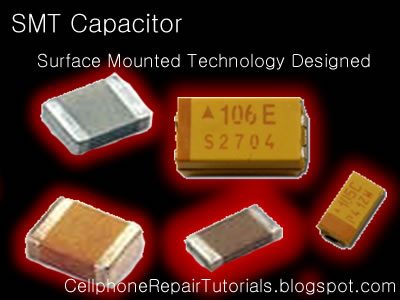
The types of capacitor which is commonly used in small space circuit like the cellphone uses the  Tantalum  type of capacitor,  Tantalum   capacitors  are used in smaller electronic devices including portable telephones, pagers, personal computers, and automotive electronics. It also offer smaller size and lower leakage than standard. . There are two types of Capacitors used in Mobile Phones Circuits, The  Polarized  and  Non-Polarized  Capacitors. This are the Capacitors may look like  that are being used in mobile phones circuit. The Polarized Capacitor  Tantalum Capacitors  which is polarized, and may be used in DC circuits. Typical values range form 0.1uF to 470uF. Standard Tantalum values change in multiples of 10, 22, 33, and 47. Normal Temperature Coefficient [TC] for Tantalum Capacitors is  + 5%. Polarized capacitors are typically used in large voltage situations, such as DC line filtering to reduce noise related t...

Nokia 1280 Keypad Ic Jumper Solution

Image

How to Identify Capacitor's Symbols and Layout

Image
There are two types of capacitors, the  Polarized and the  Non-polarized. The Polarized is indicated with   ''+'' positive and  ''-'' negative, meaning this cannot be change into its mounting position from a certain connection of a circuit polarity, The ''+'' positive is for the voltage supply line B+ only and the '' - '' negative is for the grounding lines. The capacitor will blown up if putting it into a non desired polarity position. Non-polarized capacitor is a non-polar or without polarity meaning its position can be change without damaging it. In Schematic Diagram it is stated as letter ''C'' stands for Capacitance then a mounting code and Capacitance value. The Polarized indicated with desired maximum voltage value. like for example C7597 1000mF_ 14V  , the ''14V'' is the desired maximum voltage for that said capacitor. While the Non-polarized labeled without desired voltage. example:...

LCD Display Problem repair solution on Nokia 5000d

Image
This solution guide will show you the pin configuration of the LCD display connector of where and which particular components it is being connected for an easy tracing procedure method.  The LCD display circuit comes with a display driver IC, which is a good  spot to start to check, test, rework and replace.

LG KP500 IMEI Change Without Any Box

Image
1st if you want unlock: step by step to unlock KP500 1- instal lg drivers, i think that this one is enough: http://rapidshare.com then connect mob with usb cable without battery,sim or any memory(mmc) it will find new hardware, let it install drivers auto after install drivers remove phone from usb port 2- donwload this: http://rapidshare.com extract and put the file "KP500.flb" in c:\ 3- open the software KP500-Utils-EN.exe Press O ( Backup STATIC_EEP...) then ENTER then write: \\.\USB1 and press ENTER then write: C:\KP500.flb and press ENTER then write static_eep and press ENTER then connect phone to usb and wait, it should create 2 files in Lg-utils folder, one with name STATIC_EEP with 80kb and other STATIC_EEP.big delete the STATIC_EEP.big file and copy STATIC_EEP file to c:\ 4- then open again KP500-Utils-EN.exe software if you close it write P (Unlock) then ENTER then write c:\STATIC_EEP and ENTER unlock code will appear now turn on the phone, type 2945#*71001# enter i...

Nokia C6 Format Soft Reset - Hard Reset to Factory Settings

Image
How to format or reset the Nokia C6 to factory fresh default settings. This instructions below is a guide on how to reset the device.  Note: This process may delete  the files you installed on Nokia C6. This may only advisable if the phone experiencing frozen or hang problems, burned out by excessive use or after installing 3rd party applications. You may need to back up all important data stored on the phone before you proceed, Nokia C6 Soft Reset: This will not harmed your data . Soft reset only restores .ini files from Flash ROM on board memory of your Nokia C6.   1.). Dial *#7780# 2). Press Ok/Yes Nokia C6 Hard Reset This will delete your data and installed applications. Hard reset will fully restore your Nokia C5-03 to default factory setting. 1). Turn the Nokia C6 OFF 2). Remove  the battery and reinsert it back again, then Turn it ON. 3). Dial this numbers *#7370# 4). Then Press Ok/Yes Nokia C6 Hard Reset through button combination. 1). Turn the Nokia C6 OFF 2...